Mastering
World‑class mastering. Zero black‑box guessing.
MasterCurrent DSP measures your mix, brings out its best in minutes, and shows you every move it made. Press one button, or dial in your sound with the Pro console. Your first master is free: lossless downloads plus MP3, a full Pro console test drive, and no credit card required.
Master a song
1 free master. Full-quality WAV, FLAC and 320 kbps MP3 downloads. No credit card required.
- Same settings, same master.
- A full report with every master.
- Calibrated limits that protect your mix.
MasterCurrent DSP
See every move. Hear every change.
Our engine is DSP we built from the ground up: the same kind of signal processing behind classic studio EQs, compressors and limiters, driven by rules we engineered rather than an AI black box. It measures your mix directly and sets every move from those numbers. The same settings produce the same master every time, every move stays inside strict limits, and your files are never used to train AI.
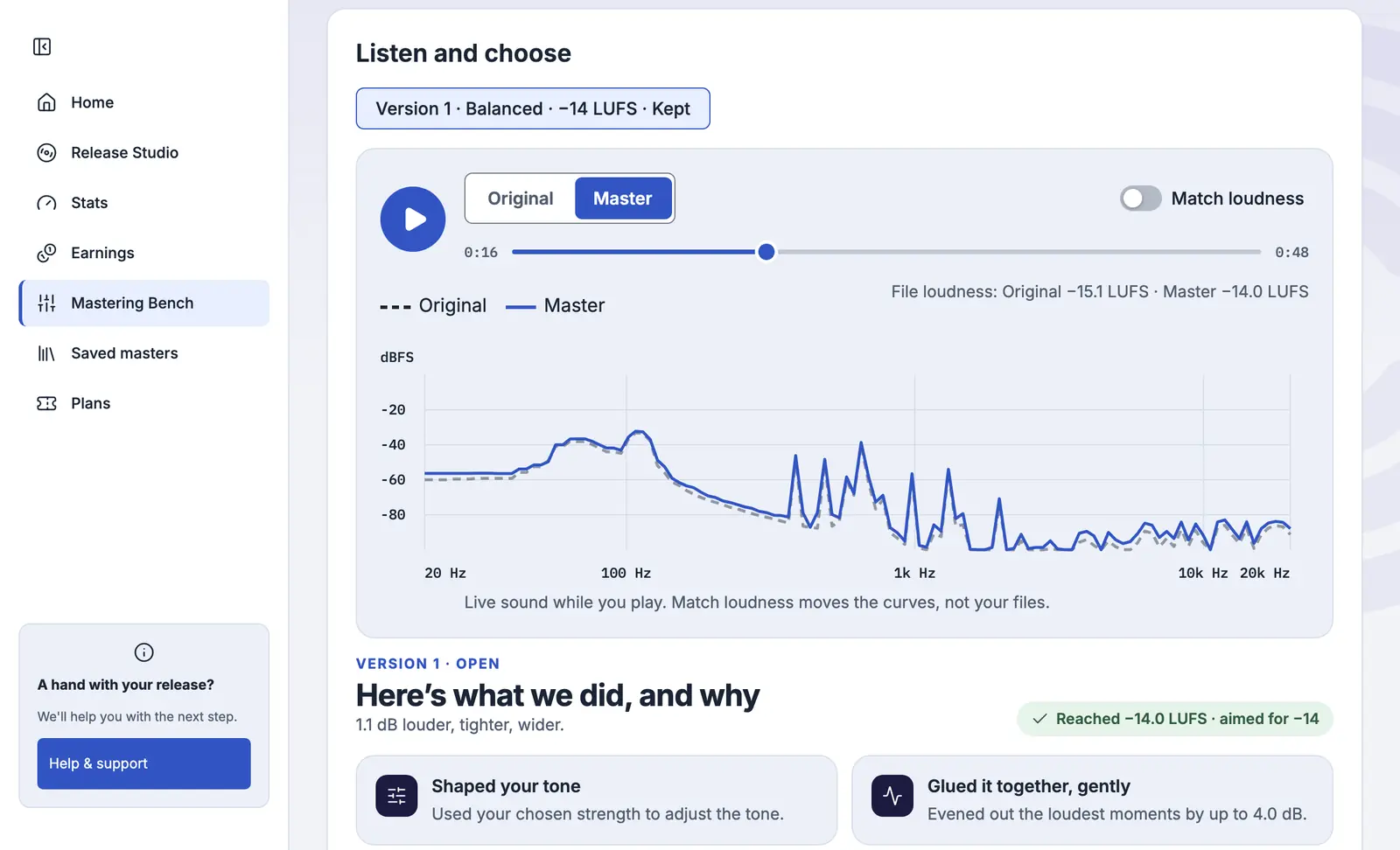
Every master includes a detailed report showing what changed and why. Play your master against your original mix, then switch on Match loudness to hear the real tonal and dynamic polish, not just the extra volume.
Your report sits right under the player.
One click, or total control.
Both paths run on the same engine. Let it recommend a strength and master your song in minutes, or step into the Pro console and fine-tune every move yourself.
Guided
Pick your level and strength. Press one button.
The engine measures your audio, recommends a strength, and works through tone, dynamics, stereo width and loudness inside strict limits. Tick clicks, sharp vocal edges or harshness up top, and it repairs just those moments.
Pro console
Studio-grade control in your browser.
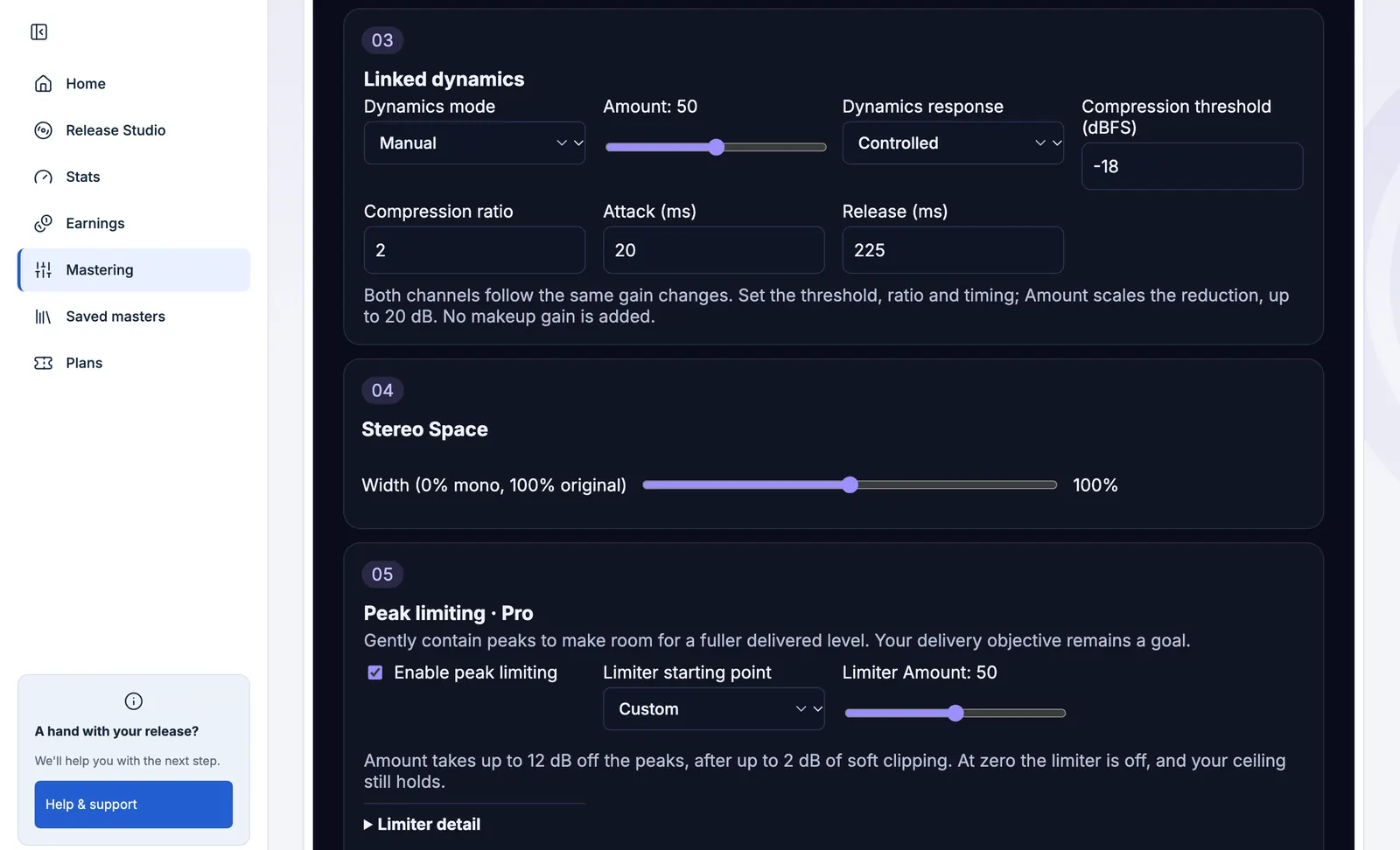
A six-band EQ at ±12 dB with low and high cuts, a compressor up to 20 dB with your own threshold, ratio, attack and release, your own true-peak ceiling, stereo width from mono to 200%, and a live before-and-after spectrum. Start from the guided settings or from Warm, Bright or Punchy, build your own sound, and save up to 20 presets of your own. Comes with Artist Pro and Mastering Advanced, along with Overdrive.
Blind test
We’ll take on your mix. Blind.
Put up to four versions in a blind test, your own mix included. We hide the names, shuffle the order and match the loudness, so only the sound can win. Answer four quick questions, then see which was which. The big online mastering services don’t offer this. We built it in, because we expect to win.
Blind tests, and comparing several versions side by side, come with Artist Plus, Artist Pro, both Mastering plans and Master one song.
It improves your mix. It won’t rewrite it.
Other engines can carve up a finished mix. Ours can’t: on its own, it never moves the tone more than 4 dB. Every strength has a hard ceiling on every move, and the engine recommends one after measuring your mix: Light if it’s already been pushed hard or has phase problems, Assertive if it comes in under −18 LUFS, and Balanced for everything else.
| Strength | Tone | Dynamics | Width |
|---|---|---|---|
| Light | At most one broad cut of 0.5 to 2 dB, at 140 Hz or 4 kHz, only where that area stands out by more than 2 dB | Up to 2 dB at 1.5:1, slower on the hits so the drums still land | Left as you made it |
| Balanced | Up to 2 dB up or down at 250 Hz and 4 kHz, plus 0.75 dB of air at 8 kHz | Up to 4 dB at 2:1 | 10% wider above 300 Hz, with the bass below 120 Hz in mono |
| Assertive | Up to 4 dB up or down at 250 Hz and 4 kHz, plus 1.5 dB of air at 8 kHz | Up to 6 dB at 3:1, with warm saturation | 20% wider above 300 Hz, with the bass below 120 Hz in mono |
| Pro console | Six bands at ±12 dB, plus low and high cuts | Up to 20 dB, with your own threshold, ratio, attack and release | Anywhere from mono to 200% |
The report with every master shows exactly what it did.
Competitive volume without squashing transients.
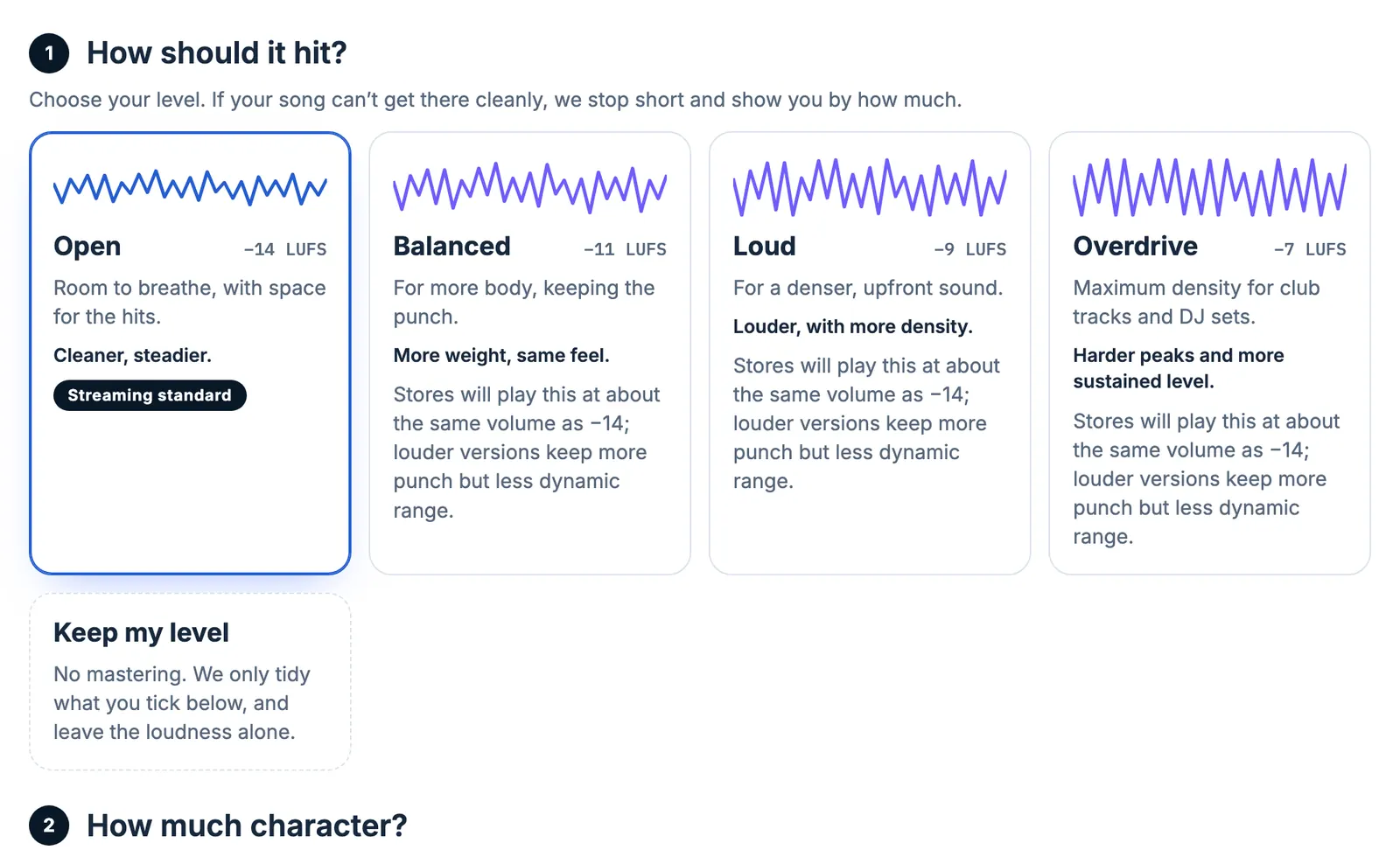
Choose your loudness level, measured in LUFS. MasterCurrent DSP gets there cleanly with true-peak limiting, or stops short and tells you by how much, instead of crushing your transients to hit an arbitrary number. Streaming services even out volume anyway. Choose Open for dynamic acoustic music, Balanced for pop and rock, Loud for hip-hop, EDM and heavy guitars, or Overdrive (Artist Pro and Mastering Advanced) for club tracks and DJ sets.
| Level | Target | Spotify turns it down by about | Best for |
|---|---|---|---|
| Open | −14 LUFS | 0 dB | The default. Acoustic, jazz, classical, anything that needs room to breathe |
| Balanced | −11 LUFS | 3 dB | Most pop, rock, R&B and singer-songwriter |
| Loud | −9 LUFS | 5 dB | Hip-hop, EDM, heavy guitars |
| Overdrive | −7 LUFS | 7 dB | Club tracks and DJ sets. With Artist Pro and Mastering Advanced |
Peaks stay under −1 dBTP in both the WAV and the FLAC, so your master stays clean after stores convert it. A mix that’s already louder keeps its own level. Keep my level skips mastering and only cleans up what you tick. In the Pro console, set your own ceiling, down to −3 dBTP.
Albums
Albums that play as one record.
Songs recorded in different rooms, or years apart, rarely sit together on their own. Master as an album runs every song through the same settings, then evens out level and tone between them, so the record holds together from the first song to the last. A song that’s meant to be quieter, like a ballad, keeps its level. Aim for a reference master if you like, and hear the whole album at real levels before you approve it.
Master as an album comes with Artist Pro and Mastering Advanced.
Questions about mastering
Is my first master really free?
Yes. Sign up for a free account and master your first song at no cost. Try different settings, explore the Pro console, compare it with your mix at matched loudness, and download your final 24-bit WAV, FLAC and 320 kbps MP3 files. No credit card required.
What does mastering do?
It’s the last step between your mix and the stores. Mastering sets the level, balances the tone, controls the loudest moments and keeps the peaks low enough to play cleanly after stores and apps convert the file.
My mix already sounds good. Why master it?
Because a release is held to a different standard. Mixes are usually left with headroom, so they sit quieter than released songs, and peaks close to 0 dB can crackle once a store converts the file. Mastering closes that gap. If your mix is already where you want it, Keep my level only tidies what you tick.
Will it change my mix too much?
Not unless you ask it to. Light makes at most one small tone cut, and only where something stands out. Balanced and Assertive go further, within the hard limits above. Your original stays in your account, and you can make another version any time.
Is this AI mastering?
No. It’s MasterCurrent DSP, our own engine, built on rules we wrote. That’s why the same settings always give the same master, and why the report can tell you exactly what it did. Your music is never used to train AI.
What do I send, and what do I get back?
Send a 16- or 24-bit WAV or FLAC, up to 10 minutes and 500 MB, at 44.1 to 192 kHz. You get your master as 24-bit WAV and FLAC files on every plan, plus a 320 kbps MP3 to share.
Can the master go straight onto my release?
Yes. Choose Use in my release and the master goes onto that song in Release Studio, ready to distribute. Nothing goes on a release until you say so, and you can download the files to use anywhere.
Mastering on its own
Don’t need distribution? Use our mastering engine on its own, on any project.
- Master one song: US$2.99 (introductory; US$4.99 regular). Includes 24-bit WAV, FLAC, 320 kbps MP3 and the report.
- Mastering Standard: From US$5.99 a month. Unlimited Standard mastering (fair use) across all your projects.
- Mastering Advanced: From US$9.99 a month. Unlimited mastering (fair use) with the full Pro console, your own presets and Master as an album.
Distributing with us? Standard mastering is already included with every yearly release plan, and Artist Pro includes the Pro console.
Mastering by an engineer
For projects that need an engineer, we’ll connect you with an experienced mastering engineer.
[email protected]